



ABLLS-R A-I Tracking Sheet & Scoring Dashboard, ABLLS-R Assessment, ABLLS-R Excel & Google Sheets Data Tracking & Visual Graphs

Soulful Systems
✨ ABLLS Tracking Sheets (Excel & Google Sheets) – Domains A–I ✨
Automated ABLLS Scoring, Tracking & Dashboards
This ABLLS tracking sheets Excel workbook is a streamlined, automated solution for clinicians who want to score, track, and visualize ABLLS assessments without manual calculations or coloring grids.
Designed for BCBAs, educators, and therapists, this tool replaces traditional paper-based ABLLS tracking sheets with a clean, easy-to-use Excel and Google Sheets system that automatically calculates scores, % mastery, and progress visuals—making assessment review and reporting faster and clearer.
📂 What’s Included (4 Tabs)
⚙️ 1. Set Up Tab
Customize the system to match your practice:
-
Edit domain names and labels
-
Adjust mastery thresholds (e.g., Emerging, Developing, Mastered)
-
Customize reporting terminology
All charts and dashboards update automatically based on your settings.
📝 2. Assessment Tab (Domains A–I)
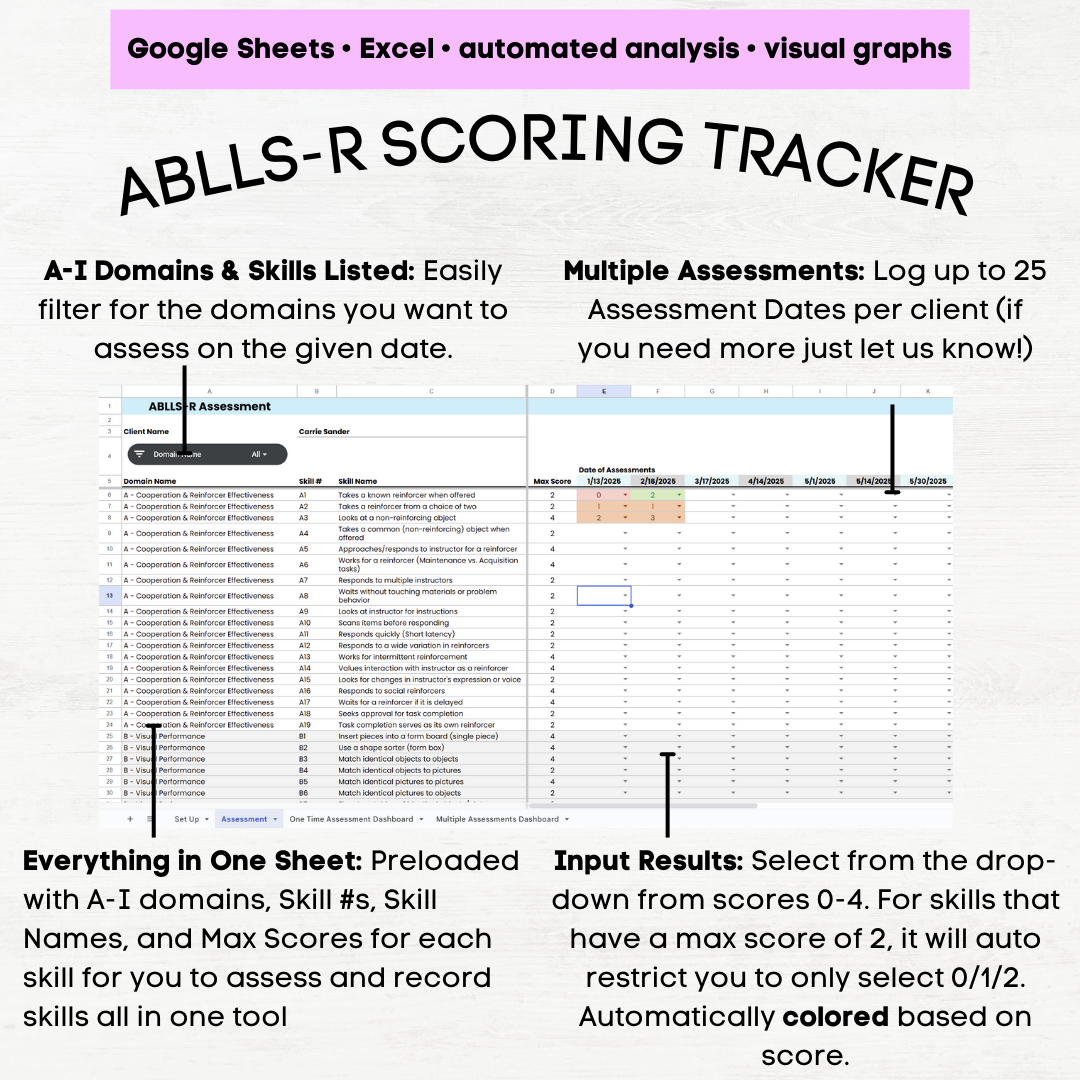
Your main ABLLS tracking and scoring workspace.
-
Covers ABLLS Domains A–I (foundational learner skills)
-
Preloaded with:
-
Skill numbers
-
Brief, synthesized skill descriptions
-
Maximum score per skill
-
-
Skill descriptions are summarized and not copied from the official ABLLS-R guide
-
Reference the official guide for full definitions of 0–4 scoring
-
Log up to 25 assessment dates horizontally
-
Enter scores using restricted drop-downs (0–4)
-
Automatic limits prevent scoring above the max (e.g., max of 2 where applicable)
-
Built-in filters / slicers to assess only selected domains on a given day
-
Clean layout with a step-by-step PDF instruction guide included
This tab functions as both an ABLLS scoring sheet and an ABLLS tracking sheet in Excel.
📊 Analytics & Dashboards
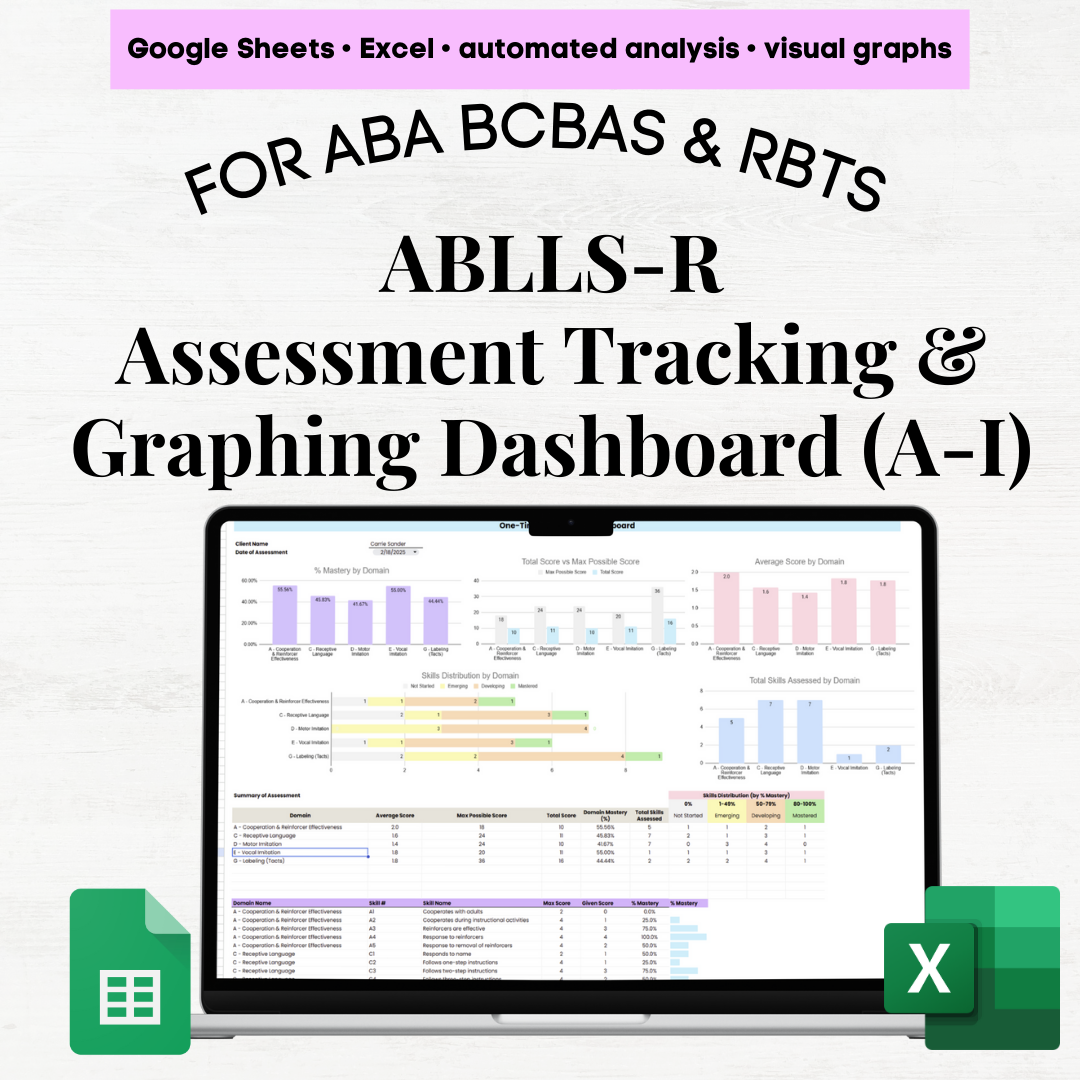
📈 3. One-Time Assessment Dashboard
Filter by a single assessment date and instantly view:
-
% mastery by domain (for domains assessed that day)
-
Total score vs. maximum possible score
-
Average score by domain
-
Skill distribution by domain:
-
Not Started (0%)
-
Emerging (1–49%)
-
Developing (50–79%)
-
Mastered (80–100%)
-
-
Number of skills assessed per domain
(Customizable labels and thresholds in the Set Up tab)
Includes both:
-
A domain-level summary table
-
A detailed skill-level breakdown
📉 4. Multiple Assessments Dashboard (Progress Over Time)
Built for progress monitoring and reporting.
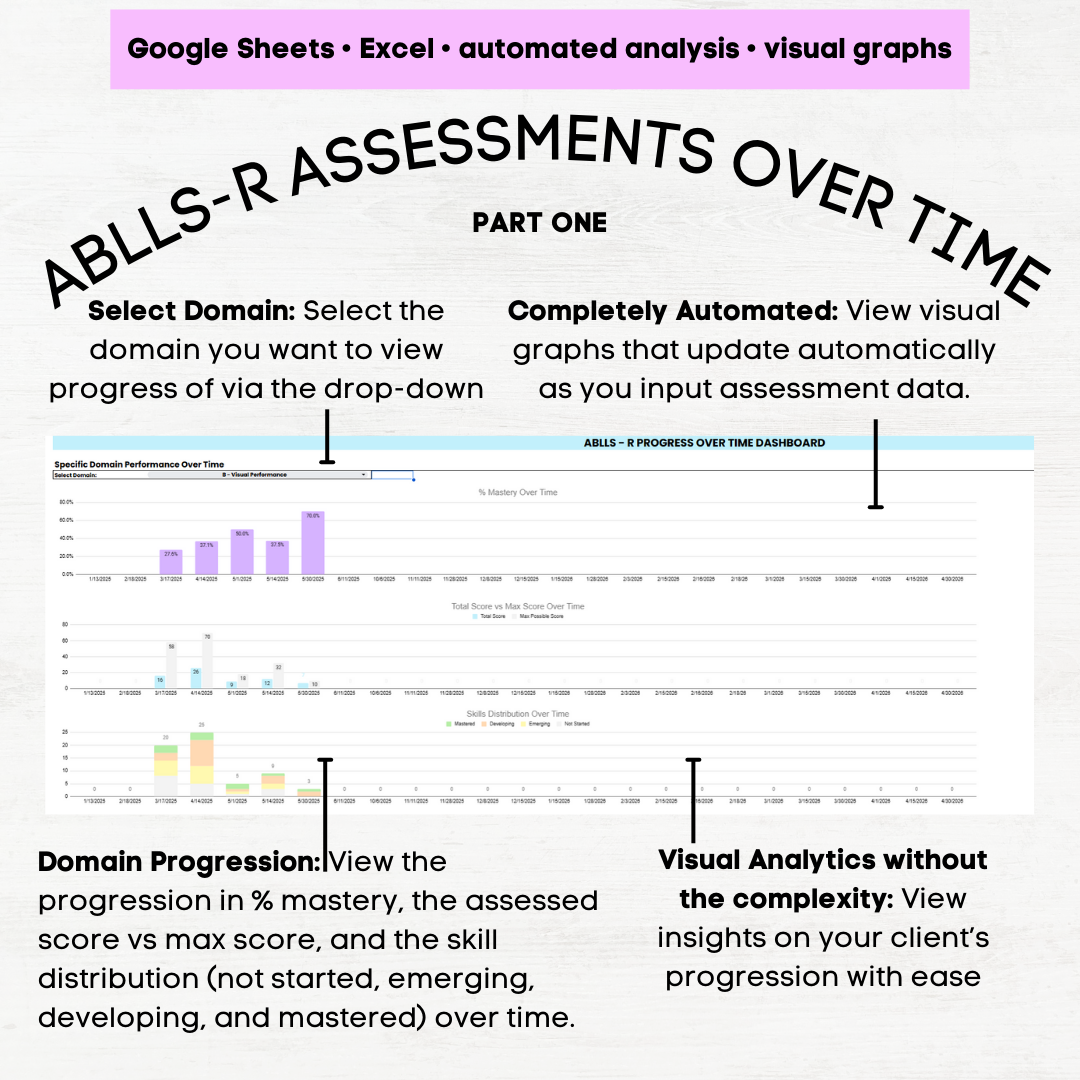
Domain Focus Section
-
Filter to a specific domain to view:
-
% mastery over time
-
Total score vs. max score over time
-
Skill distribution trends
-
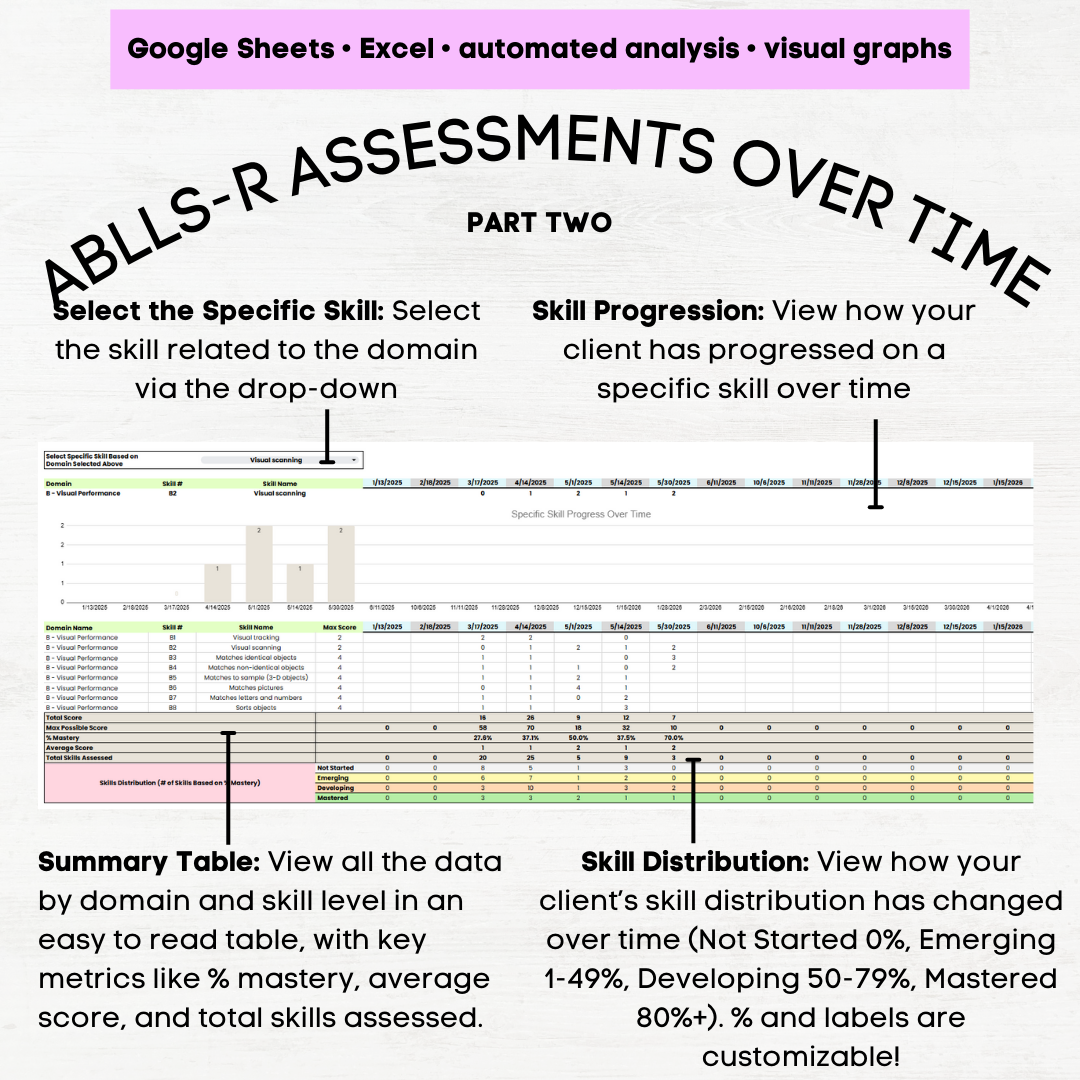
Progress of individual skills across assessment dates
-
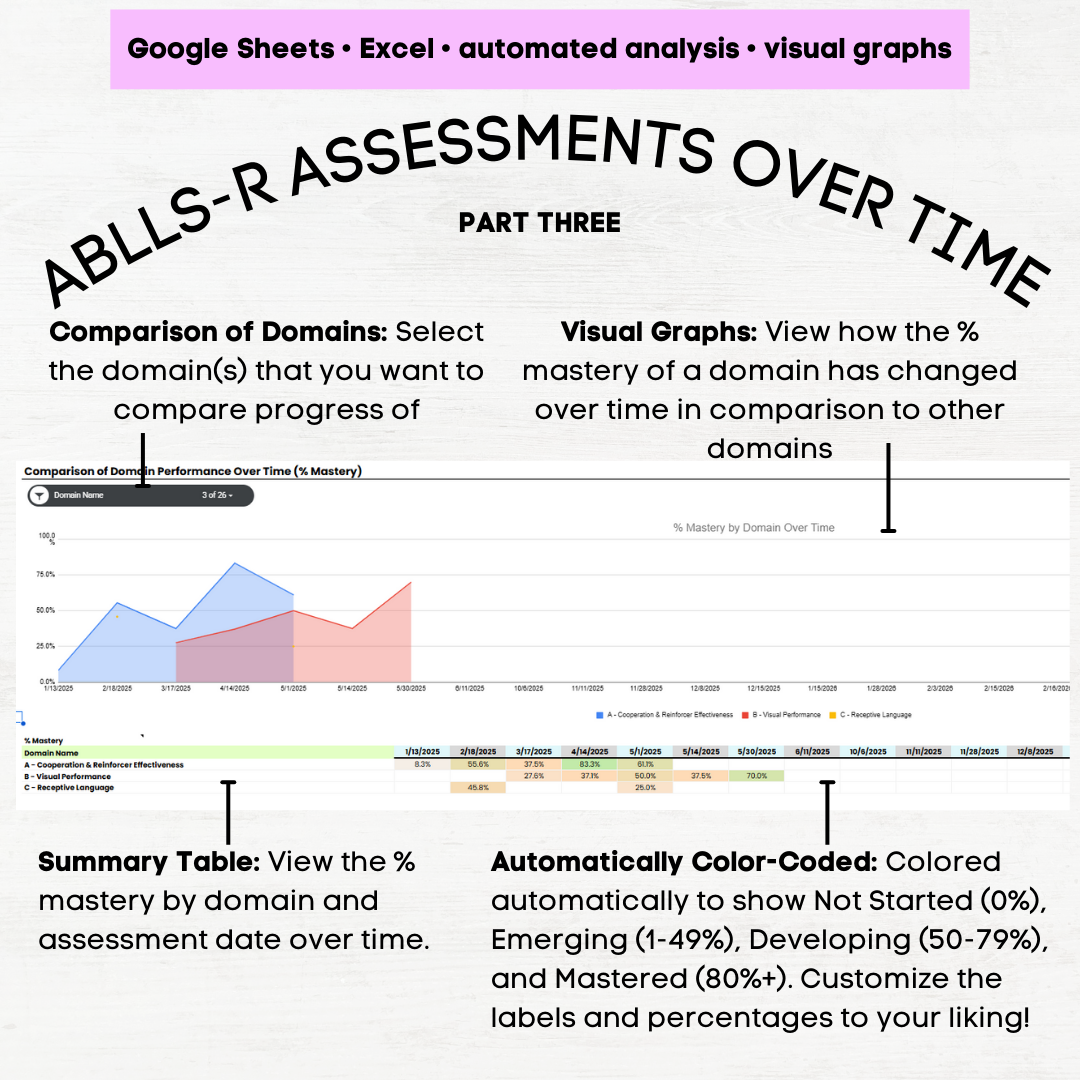
Domain Comparison Section
-
Compare % mastery across multiple domains over time
-
Automatically color-coded summary table
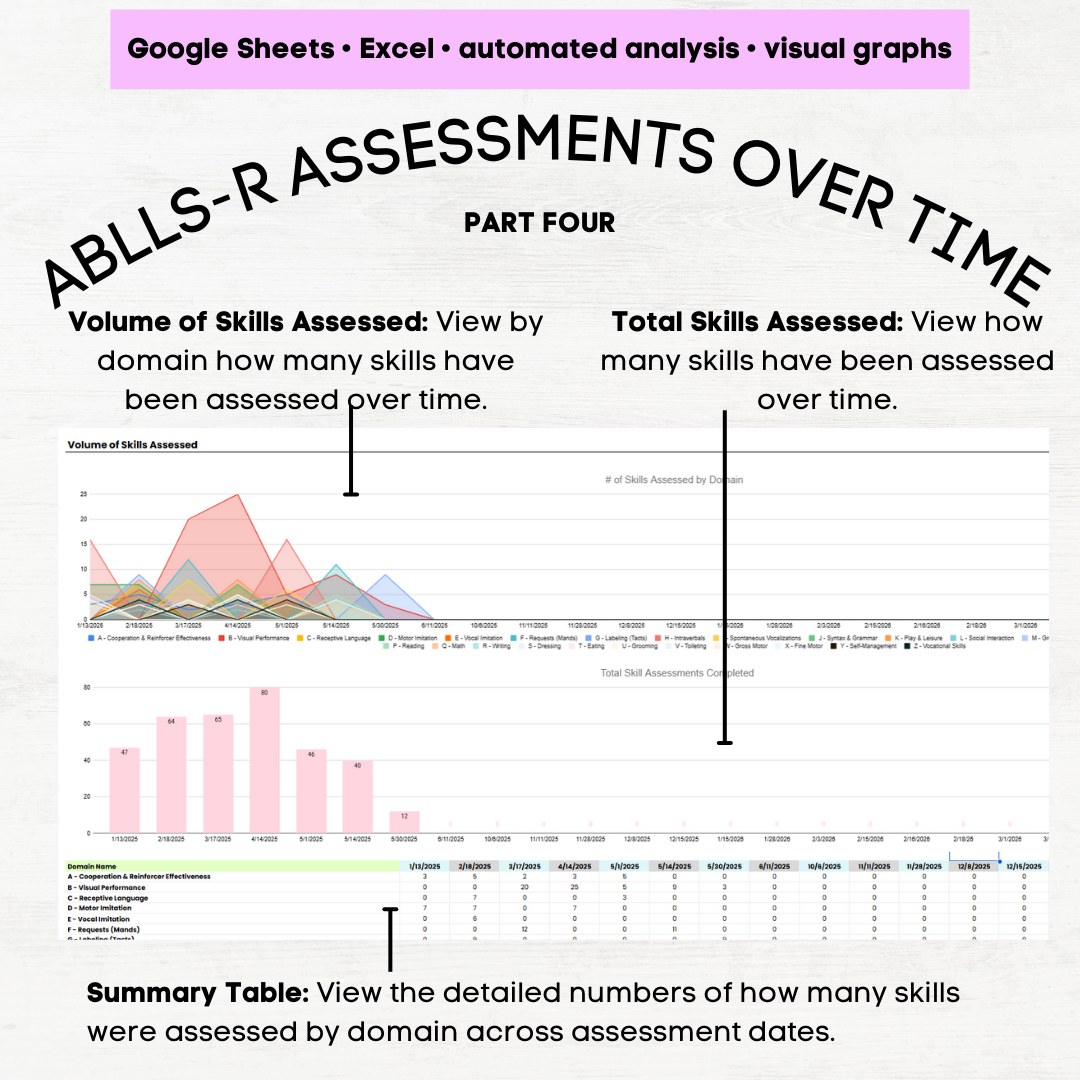
Assessment Volume Section
-
Number of skills assessed by domain
-
Total skills assessed over time
-
Summary table showing assessment volume across dates
💡 Why You’ll Love These ABLLS Tracking Sheets
-
Purpose-built ABLLS tracking sheets in Excel & Google Sheets
-
Works as both a scoring sheet and progress tracker
-
No manual calculations or color-coding ✋
-
Automated totals, averages, and % mastery
-
Built-in safeguards prevent scoring errors
-
Clear visuals for reporting to caregivers, teams, and stakeholders
-
Intuitive design—great for spreadsheet beginners
✅ Ideal For:
-
Clinicians who want ABLLS tracking sheets Excel-based
-
Teams focused on foundational domains (A–I)
-
Progress monitoring, reporting, and visual data review
-
Anyone looking for a simplified alternative to full A–Z ABLLS systems
$29.99
✨ ABLLS Tracking Sheets (Excel & Google Sheets) – Domains A–I ✨
Automated ABLLS Scoring, Tracking & Dashboards
This ABLLS tracking sheets Excel workbook is a streamlined, automated solution for clinicians who want to score, track, and visualize ABLLS assessments without manual calculations or coloring grids.
Designed for BCBAs, educators, and therapists, this tool replaces traditional paper-based ABLLS tracking sheets with a clean, easy-to-use Excel and Google Sheets system that automatically calculates scores, % mastery, and progress visuals—making assessment review and reporting faster and clearer.
📂 What’s Included (4 Tabs)
⚙️ 1. Set Up Tab
Customize the system to match your practice:
-
Edit domain names and labels
-
Adjust mastery thresholds (e.g., Emerging, Developing, Mastered)
-
Customize reporting terminology
All charts and dashboards update automatically based on your settings.
📝 2. Assessment Tab (Domains A–I)
Your main ABLLS tracking and scoring workspace.
-
Covers ABLLS Domains A–I (foundational learner skills)
-
Preloaded with:
-
Skill numbers
-
Brief, synthesized skill descriptions
-
Maximum score per skill
-
-
Skill descriptions are summarized and not copied from the official ABLLS-R guide
-
Reference the official guide for full definitions of 0–4 scoring
-
Log up to 25 assessment dates horizontally
-
Enter scores using restricted drop-downs (0–4)
-
Automatic limits prevent scoring above the max (e.g., max of 2 where applicable)
-
Built-in filters / slicers to assess only selected domains on a given day
-
Clean layout with a step-by-step PDF instruction guide included
This tab functions as both an ABLLS scoring sheet and an ABLLS tracking sheet in Excel.
📊 Analytics & Dashboards
📈 3. One-Time Assessment Dashboard
Filter by a single assessment date and instantly view:
-
% mastery by domain (for domains assessed that day)
-
Total score vs. maximum possible score
-
Average score by domain
-
Skill distribution by domain:
-
Not Started (0%)
-
Emerging (1–49%)
-
Developing (50–79%)
-
Mastered (80–100%)
-
-
Number of skills assessed per domain
(Customizable labels and thresholds in the Set Up tab)
Includes both:
-
A domain-level summary table
-
A detailed skill-level breakdown
📉 4. Multiple Assessments Dashboard (Progress Over Time)
Built for progress monitoring and reporting.
Domain Focus Section
-
Filter to a specific domain to view:
-
% mastery over time
-
Total score vs. max score over time
-
Skill distribution trends
-
Progress of individual skills across assessment dates
-
Domain Comparison Section
-
Compare % mastery across multiple domains over time
-
Automatically color-coded summary table
Assessment Volume Section
-
Number of skills assessed by domain
-
Total skills assessed over time
-
Summary table showing assessment volume across dates
💡 Why You’ll Love These ABLLS Tracking Sheets
-
Purpose-built ABLLS tracking sheets in Excel & Google Sheets
-
Works as both a scoring sheet and progress tracker
-
No manual calculations or color-coding ✋
-
Automated totals, averages, and % mastery
-
Built-in safeguards prevent scoring errors
-
Clear visuals for reporting to caregivers, teams, and stakeholders
-
Intuitive design—great for spreadsheet beginners
✅ Ideal For:
-
Clinicians who want ABLLS tracking sheets Excel-based
-
Teams focused on foundational domains (A–I)
-
Progress monitoring, reporting, and visual data review
-
Anyone looking for a simplified alternative to full A–Z ABLLS systems
User Reviews
Only logged in customers who have purchased this product may leave a review.




Related Products




$29.99
There are no reviews yet.